
OSI Model, Devices, Protocols and IEEE Standards
OSI Layer
Section titled “OSI Layer”OSI vs TCP/IP Layer Mapping
| OSI Layer | TCP/IP Layer |
|---|---|
| 7 - Application | Application |
| 6 - Presentation | Application |
| 5 - Session | Application |
| 4 - Transport | Transport |
| 3 - Network | Internet |
| 2 - Data Link | Network Access |
| 1 - Physical | Network Access |
OSI Model – 7 Layers of Network Communication ⭐
7. Application Layer (Layer 7)
- Function: Interface between user and network
- Unit of Data: Data (Message)
- Protocols: HTTP, HTTPS, FTP, SMTP, DNS, DHCP, SNMP, SSH
- Services: File transfers, email, browsing, remote access
- Port Numbers: Yes (e.g., HTTP – 80, HTTPS – 443)
6. Presentation Layer (Layer 6)
- Function: Data translation, encryption, compression
- Examples: SSL/TLS, JPEG, MPEG, ASCII, EBCDIC conversion
- Encryption: SSL/TLS (also works with Layer 7 protocols)
- Compression: e.g., MP3, ZIP
- Note: Also merged into Application Layer in TCP/IP
5. Session Layer (Layer 5)
- Function: Establish, maintain, terminate communication sessions
- Examples: API calls, NetBIOS, RPC
- Dialog Control: Half/full duplex session handling
- Synchronization: Add checkpoints for recovery
- Note: Merged into Application Layer in TCP/IP
4. Transport Layer (Layer 4)
- Function: End-to-end communication, reliability, error checking
- Unit of Data: Segments (TCP) / Datagrams (UDP)
- Devices: Gateway (in legacy context)
- Protocols: TCP, UDP
- Ports: Yes (Port Numbers like 80, 443, etc.)
- Flow Control: TCP uses sliding window
- Error Control: Acknowledgements, retransmission
- Note: Gateway is Layer 3 to 7 Device
3. Network Layer (Layer 3)
- Function: Routing, logical addressing, packet forwarding
- Unit of Data: Packets
- Devices: Router, Layer-3 Switch
- Addresses: IP Address (32-bit IPv4 / 128-bit IPv6)
- Protocols: IP, ICMP, IGMP, ARP, RARP
- Routing Algorithms: OSPF, RIP, BGP
2. Data Link Layer (Layer 2)
- Function: Node-to-node delivery, MAC addressing, framing
- Unit of Data: Frames
- Devices: Switch, Bridge
- Addresses: MAC Address (48-bit)
- Protocols: Ethernet, PPP, ARP, STP
- Sub-layers: LLC (Logical Link Control), MAC (Media Access Control)
- Error Detection: Yes (CRC, checksum)
1. Physical Layer (Layer 1)
- Function: Transmits raw bits (0s and 1s) over physical medium
- Unit of Data: Bits
- Devices: Cables, Hubs, Repeaters, Network Interface Cards (NIC)
- Mediums: Copper wires, Fiber optics, Radio signals
- Standards: IEEE 802.3 (Ethernet), RS-232, DSL
| Layer | Data Unit | Device | Address Type | Special Features |
|---|---|---|---|---|
| Physical | Bits | Hub, Repeater, Cable | - | Signals, Voltages, Media |
| Data Link | Frames | Switch, Bridge | MAC Address | Framing, Error detection, Flow control |
| Network | Packets | Router | IP Address | Routing, Logical addressing |
| Transport | Segments | - | Port Numbers | Reliability, Flow & Error control |
| Session | Data | - | - | Session setup, checkpointing, Synchronisation |
| Presentation | Data | - | - | Encryption, Translation, Compression |
| Application | Data | - | - | End-user apps, Protocols like HTTP, DNS |
Special concepts/features for each OSI layer
7. Application Layer (Layer 7)
- Network Services: Email, file transfer, web
- User authentication & authorization
- Application Protocols: HTTP, FTP, DNS, SMTP, DHCP, etc.
- Data presentation to end-user
- More:
- Application Attacks: SQL Injection, Cross-site scripting (XSS)
- Cookies, Caching, Session management
- FTP Modes: Active vs Passive
- HTTP Methods: GET, POST, PUT, DELETE
- DNS Record Types: A, AAAA, MX, CNAME, NS
6. Presentation Layer (Layer 6)
- Data Translation: ASCII ⇄ EBCDIC
- Encryption/Decryption: SSL/TLS
- Compression/Decompression: JPEG, ZIP
- Serialization (e.g., JSON, XML)
- More:
- Syntax Translation Examples: JSON ↔ Binary, XML ↔ Binary
- Secure Transmission Handling (TLS Handshake)
- Character Encoding Standards: UTF-8, ASCII, EBCDIC
5. Session Layer (Layer 5)
- Session establishment, maintenance, termination
- Dialog control: full-duplex/half-duplex
- Synchronization: Add checkpoints for recovery
- More:
- Token Management (used in some protocols)
- Dialog Management Protocols (not common now but exam relevant)
- Remote Procedure Call (RPC)
4. Transport Layer (Layer 4)
- Segmentation and reassembly
- Port numbers
- Reliable transmission: TCP
- Unreliable but fast: UDP
- Flow Control: Sliding Window
- Error Control: ACKs, checksums
- Multiplexing/Demultiplexing
- Error control mechanism: ARQ
- Stop-and-Wait ARQ (Automatic Repeat reQuest):
- Go-Back-N ARQ (Automatic Repeat reQuest):
- Selective Repeat ARQ (Automatic Repeat reQuest):
- More:
- TCP Header Fields: Sequence Number, ACK, Flags (SYN, FIN, RST, etc.)
- Connection Establishment: Three-Way Handshake
- Connection Termination: Four-step FIN process
- Congestion Control Algorithms:
- Slow Start, Congestion Avoidance, Fast Retransmit, Fast Recovery
- Flow vs Congestion Control (difference)
3. Network Layer (Layer 3)
- IP addressing (IPv4/IPv6)
- Routing Algorithms: OSPF, RIP, BGP
- Fragmentation/Reassembly
- Packet forwarding
- Error Messaging: ICMP
- Multicast Handling: IGMP
- Address Mapping: ARP/RARP
- More:
- IP Header Fields (e.g., TTL, Version, Protocol)
- CIDR (Classless Inter-Domain Routing)
- NAT (Network Address Translation)
- Subnetting & Supernetting
- Private vs Public IPs
- ICMP Message Types (Echo, Destination Unreachable, etc.)
2. Data Link Layer (Layer 2)
- Framing
- MAC addressing (48-bit)
- Error Detection: CRC, Checksum
- Error Detection & Correction: 2D Parity, Hamming Code
- Flow Control: Stop-and-wait ARQ, sliding window (optional), Go Back N ARQ , Selective Repeat ARQ
- Access control: CSMA/CD (Ethernet), CSMA/CA (Wi-Fi)
- Sublayers: LLC & MAC
- Protocols: Ethernet, PPP, ARP, STP
- More:
- Framing Methods:
- Character Count, Byte Stuffing, Bit Stuffing
- Logical Link Control (LLC) & Media Access Control (MAC) sublayers
- Access Control Methods:
- ALOHA, CSMA/CD, CSMA/CA
- Switching Techniques: Circuit, Packet, Message (conceptual link)
- HDLC Protocol (High-Level Data Link Control)
- Framing Methods:
1. Physical Layer (Layer 1)
- Modulation/Demodulation
- Signal encoding (analog/digital)
- Non-Return to Zero (NRZ): 1 = High, 0 = Low (no mid-bit transition)
- Return to Zero (RZ): 1 = High then zero in same bit, 0 = stays zero
- Manchester Encoding: 1 = Low to High transition, 0 = High to Low transition
- Bit synchronization
- Voltages, pin-outs, connectors
- Media types: copper, fiber, wireless
- Standards: IEEE 802.3, RS-232
- More:
- Line Coding (Already Added): NRZ, RZ, Manchester
- Bit Rate vs Baud Rate
- Bit Rate = bits/sec, Baud Rate = symbols/sec
- Multiplexing Techniques:
- TDM (Time Division Multiplexing)
- FDM (Frequency Division Multiplexing)
- WDM (Wavelength Division Multiplexing – used in fiber)
- Attenuation, Noise, Signal-to-Noise Ratio (SNR)
- Transmission Modes: Simplex, Half Duplex, Full Duplex
Protocols
Section titled “Protocols”Networking Protocols & OSI Model Layers
7. Application Layer (OSI Layer 7 / TCP Layer 4)
| Protocol | Full Form | Function/Use | Transport Layer | Port Number |
|---|---|---|---|---|
| HTTP ⭐ | HyperText Transfer Protocol | Web browsing (www), transfers web pages | TCP | 80 |
| HTTPS | HTTP Secure | Secure version of HTTP using SSL/TLS encryption | TCP | 443 |
| FTP ⭐ | File Transfer Protocol | Transfer files between computers | TCP | 20 (Data), 21 (Control) ⭐ |
| SFTP | Secure FTP | Encrypted version of FTP (via SSH) | TCP | 22 |
| SMTP ⭐ | Simple Mail Transfer Protocol | Sends emails (outgoing mail) | TCP | 25 (or 587 for submission) |
| POP3 ⭐ | Post Office Protocol v3 | Downloads emails to local client (one-way) | TCP | 110 |
| IMAP ⭐ | Internet Message Access Protocol | Email access & sync from server | TCP | 143 (993 for IMAPS) |
| DNS ⭐ | Domain Name System | Converts domain names to IP addresses | TCP/UDP | 53 |
| DHCP | Dynamic Host Configuration Protocol | Assigns IP addresses dynamically | UDP | 67 (Server), 68 (Client) |
| SNMP | Simple Network Management Protocol | Monitors and manages network devices | UDP | 161 (queries), 162 (traps) |
| Telnet | - | Remote terminal access (plain text, insecure) | TCP | 23 |
| SSH | Secure Shell | Secure remote login (replaces Telnet) | TCP | 22 |
2. Transport Layer (OSI Layer 4 / TCP Layer 3)
| Protocol | Full Form | Function/Use |
|---|---|---|
| TCP | Transmission Control Protocol | Reliable, connection-oriented, error-checked |
| UDP | User Datagram Protocol | Fast, connectionless, no guarantee of delivery |
Note:
- TCP is used in HTTP, FTP, SMTP, etc.
- UDP is used in DNS, VoIP, video streaming, etc.
3. Network Layer (OSI Layer 3 / TCP Layer 2)
| Protocol | Full Form | Function/Use |
|---|---|---|
| IP | Internet Protocol | Assigns addresses and routes packets |
| ICMP | Internet Control Message Protocol | Error & control messages (used in ping) |
| IGMP | Internet Group Management Protocol | Manages multicast group memberships |
| ARP | Address Resolution Protocol | Resolves IP → MAC address within LAN |
| RARP | Reverse ARP | Resolves MAC → IP address (obsolete) |
IP Types:
- IPv4: 32-bit
- IPv6: 128-bit (modern, supports more devices)
4. Data Link Layer (OSI Layer 2 / TCP Layer 1)
| Protocol | Full Form | Function/Use |
|---|---|---|
| Ethernet | - | LAN communication using MAC address |
| PPP | Point-to-Point Protocol | Connects two routers directly over serial link |
| HDLC | High-Level Data Link Control | Used in WANs |
| STP | Spanning Tree Protocol | Prevents loops in LAN (switch networks) |
5. Physical Layer (OSI Layer 1 / TCP Layer 1)
| Protocol/Tech | Function/Use |
|---|---|
| DSL | Digital Subscriber Line (broadband) |
| ISDN | Integrated Services Digital Network |
| Ethernet | Also works here (defines cables/speeds) |
| USB, RS-232 | Serial transmission protocols |
TCP/IP Protocol Suite with Real Life Examples | Why TCP/IP Used | Fundamentals of Networking
☁️ Server (eg. google) / /These layer are manage by 🌐 www /InternetOS in device automatically /┌---------┐ /| A Layer | 📶 Internet Service Provider (ISP)|---------| /| T Layer | /|---------| /| I Layer | 🛜 Router / Wifi Access Point|---------| /| L Layer | /└---------┘ ↰ / 💻---------⬏ DeviceIn every device, the way data is sent and received over the internet follows a specific structure of layers, which are managed by the operating system (OS). These layers ensure that data reaches its destination correctly and securely.
Imagine you want to visit a website like www.google.com on your browser. When you type the website address and press enter, the data flow through several layers in your device and the network, ultimately displaying the webpage on your screen. Let’s break down these layers:
7. Application Layer
- When you open a website like
www.google.com, your browser communicates using thehttp://orhttps://protocols. Here’s what happens at this layer: - Encryption & Decryption: If you’re using
https://, your data is encrypted before being sent out, ensuring security. When the data is received, it’s decrypted so it can be understood by your browser. - Domain Name System (DNS): The website address you type, such as
www.google.com, isn’t directly understood by computers. They need an IP address, which is like a phone number for servers. The DNS, working at this layer, translates the domain name (www.google.com) into an IP address of the nearest Google server so your request can be routed correctly. - For example, when you enter
www.google.com, DNS might translate it to an IP address like172.217.12.206, which your browser will use to reach Google’s server. - Note: Even if you’re using other applications like WhatsApp, which doesn’t use
httporhttps, they still operate under the Application Layer. These applications might use proprietary protocols for encrypting and transferring data, but they still follow the same layering structure.
4. Transport Layer
- In your device, you might have several applications running simultaneously, like your browser, email client, or messaging apps. The Transport Layer is responsible for managing how data is sent and received by these different applications. It does this by assigning a port number to each application, ensuring that data intended for your web browser doesn’t accidentally end up in your email client.
- TCP (Transmission Control Protocol): This is used when you need a reliable connection. For example, when you’re loading a webpage, TCP ensures that all data packets arrive correctly and in the right order.
- UDP (User Datagram Protocol): This is used for faster, but less reliable connections. It’s often used for live streaming or online gaming, where speed is more critical than perfect accuracy.
- For instance, when you load a website, TCP might use port 80 for
httpor port 443 forhttps. Meanwhile, your email application might be using port 25 for sending emails.
3. Internet Layer
- This layer deals with IP addresses, which are like the virtual addresses for devices on the internet. When you connect to a Wi-Fi network, your Internet Service Provider (ISP) assigns an IP address to your device through the router. This IP address is used to identify your device on the internet.
- IP Address: Think of it as your device’s home address on the internet. Just as a letter needs your home address to reach you, data packets need your IP address to find your device.
- For example, when your browser sends a request to Google’s server, it uses your IP address as the return address so Google knows where to send the webpage data back.
- Note: To send data, your device needs the IP address of the destination server (like Google’s server). Similarly, the server needs your IP address to send data back to you.
2. Link Layer
- This layer is responsible for the physical connection between your device and the network, usually through a MAC address. The MAC address is unique to each network device, like your computer’s Wi-Fi card or the router. It ensures that data packets can be directed to the correct hardware.
- MAC Address: Think of it as the physical address of a device on a local network. It’s like the unique serial number of your device’s network interface.
- When you send data, the data packet first travels to the router using the MAC address. The router then forwards the data to the ISP, and it continues on to the internet. When the response comes back, it follows the same path in reverse.
- For instance, when you send a request from your laptop to the router, your laptop’s MAC address ensures the data packet reaches the correct device (the router) before it’s sent out to the wider internet.
- Note: The MAC address is only needed for communication between devices on the same local network, like between your device and the router. Once the data packet leaves your local network, the MAC address isn’t used anymore.
Summary of Addresses in Your System:
- Port Number: Used at the Transport Layer to identify the specific application sending or receiving data.
- IP Address: Used at the Internet Layer to identify the device on the internet.
- MAC Address: Used at the Link Layer to identify the physical device on a local network.
Devices
Section titled “Devices”Network Devices and Their OSI Layers
| Layer 7: Application Layer Device | Function | Example(s) |
|---|---|---|
| Proxy Server | Acts as intermediary; filters content, caches requests | Squid Proxy, Web Proxy |
| Gateway ⭐ | Translates between different protocols (e.g., HTTP to FTP, VoIP) | Cloud Gateway, IoT Gateway |
| Load Balancer | Distributes HTTP/HTTPS traffic; can perform SSL termination | AWS ELB, HAProxy |
| Layer 4: Transport Layer Device | Function | Example(s) |
|---|---|---|
| Firewall | Inspects port numbers and transport protocols (TCP/UDP) | Stateful Firewall |
| Load Balancer | Distributes TCP/UDP traffic across servers | F5, NGINX Load Balancer |
| Layer 3 : Network Layer Devices | Function | Example(s) |
|---|---|---|
| Router ⭐ | Connects different networks; routes packets using IP addresses | Home Router, Cisco Router |
| Layer 3 Switch ⭐ | Combines switching and routing at high speed | Core Switch, Distribution Switch |
| Firewall (partially) | Filters packets based on IP addresses and protocols | Network Firewall |
| Brouter | Works as both Bridge (Layer 2) and Router (Layer 3) | Hybrid Networking Device |
| Layer 2 :Data Link Layer Devices | Function | Example(s) |
|---|---|---|
| Switch ⭐ | Forwards frames to correct MAC address; avoids unnecessary traffic | Ethernet Switch |
| Bridge ⭐ | Connects two LAN segments and filters traffic using MAC addresses | Transparent Bridge |
| Access Point | Provides wireless connectivity to wired LAN; uses MAC address | Wi-Fi Access Point |
| NIC | Provides MAC addressing; handles framing and error detection | Ethernet Card, Wi-Fi Adapter |
| Layer 1 : Physical Layer Devices | Function | Example(s) |
|---|---|---|
| Hub ⭐ | Broadcasts signals to all ports; no filtering | Passive Hub, Active Hub |
| Repeater | Regenerates and amplifies signals to extend network range | Wi-Fi Repeater, Signal Booster |
| Modem (partially) | Converts analog signals to digital and vice versa (modulation/demodulation) | DSL Modem, Cable Modem |
| NIC (partially) | Transmits raw bits through physical medium | Ethernet Card, Wi-Fi Adapter |
Layer 5 & 6 Doesn’t have Device
- OSI Layer 5 (Session) and Layer 6 (Presentation) do not have dedicated hardware devices.
- These layers are handled by software within end systems (like applications or OS protocols), not by network hardware.
| OSI Layer | Purpose | Handled By |
|---|---|---|
| Layer 5 – Session | Manages sessions (start, control, end of communication) | Software (APIs, sockets, OS) |
| Layer 6 – Presentation | Translates data formats (encryption, compression, encoding) | Software (codecs, TLS/SSL libs) |
Gateway vs Switch vs Bridge vs Hub vs Repeater
Gateway
- A gateway can be any layer of the OSI model, from the network layer (Layer 3) up to the application layer (Layer 7). Unlike a router, which primarily works at the network layer, a gateway’s defining
- Explanation:
- Basic gateway (router-like) → Works at Layer 3 (Network Layer) to connect networks using different protocols (e.g., IPv4 ↔ IPv6).
- Application gateway (proxy, firewall, etc.) → Works at Layer 7 (Application Layer) to translate or filter application data.
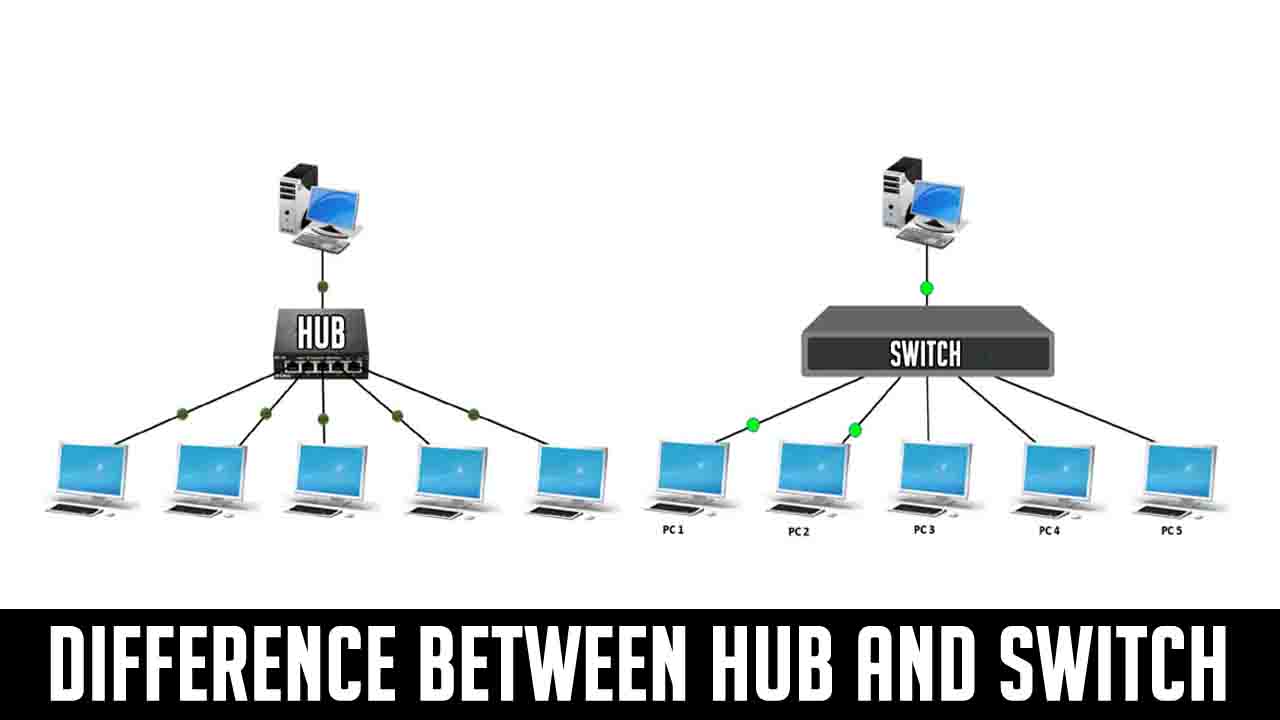
Switch
- Layer: Works at Data Link Layer (Layer 2)
- Function: Connects multiple computers in a LAN and sends data only to the correct device using its MAC address
- Smart (It learns MAC addresses and reduces unwanted traffic)
- Collision Domain: Each port has its own → No collisions
- Broadcast Domain: One (can be divided using VLAN)
- Use: Used in offices, colleges for fast and efficient communication
- Extra: Supports full-duplex (send + receive together), very fast
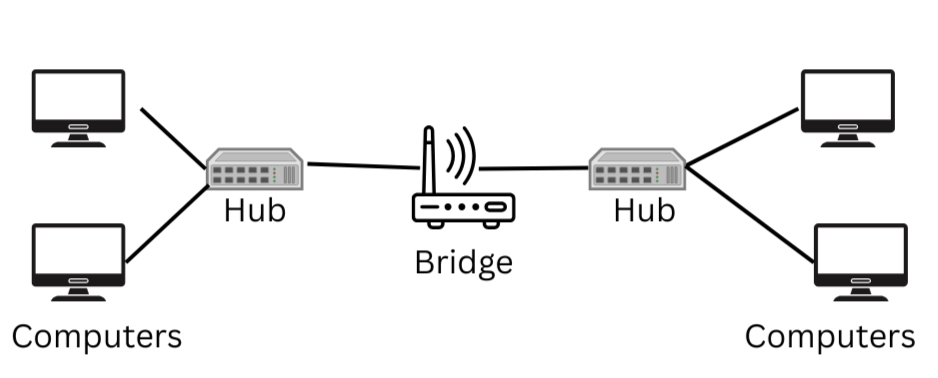
Bridge
- Layer: Also at Layer 2
- Function: Connects two LANs or two segments of a LAN, and controls traffic using MAC addresses
- Semi-smart (Not as fast as switch, but can filter traffic)
- Collision Domain: Divides collision domain (each side separate)
- Broadcast Domain: One
- Use: Used to reduce traffic between two departments/floors
- Extra: Old device, now mostly replaced by switch
Hub
- Layer: Works at Physical Layer (Layer 1)
- Function: Blindly ==broadcasts data to all devices==, not just one
- Dumb (Doesn’t care who the data is for)
- Collision Domain: One big shared → More collisions
- Broadcast Domain: One
- Use: Very small networks (now outdated)
- Extra: Works in half-duplex (send or receive, not both)
Repeater
- Layer: Works at Layer 1
- Function: Boosts weak signals so that data can travel longer distances
- Not smart (No address checking)
- Use: Extend range of LAN cable or Wi-Fi signal
- Extra: Used in large buildings or long cable runs

| Device | Layer | Smart? | Filters Data? | Use |
|---|---|---|---|---|
| Switch | L2 | Yes | Yes (MAC) | Efficient LAN communication |
| Bridge | L2 | Medium | Yes (MAC) | Connect 2 LANs or segments |
| Hub | L1 | No | No | Small/simple network (obsolete) |
| Repeater | L1 | No | No | Boost signal over long distance |
IEEE 802 Networking Standards
| IEEE Std | Technology | Description / Use | Common Devices |
|---|---|---|---|
| 802.1 ⭐ | Bridging & VLAN | LAN switching, VLANs, QoS | Switches |
| 802.2 ⭐ | LLC | Logical Link Control (Data Link sublayer) | NICs, Switches |
| 802.3 ⭐ | Ethernet | Wired LAN using CSMA/CD | NICs, Switches |
| 802.4 | Token Bus | Token passing on bus topology (obsolete) | Industrial networks |
| 802.5 | Token Ring | Token passing on ring topology (obsolete) | MAUs, NICs |
| 802.6 | DQDB | MAN using dual bus (rare) | MAN switches |
| 802.11 ⭐ | Wi-Fi (Wireless LAN) | Wireless LAN (a/b/g/n/ac/ax) | Routers, Access Points |
| 802.15 | Bluetooth, WPAN | Wireless Personal Area Network | Bluetooth Devices |
| 802.16 | WiMAX | Broadband Wireless MAN | WiMAX Devices |
| 802.17 | RPR | High-speed metro networks | Metro Rings |
| 802.20 | Mobile Broadband | Mobile broadband wireless access | Base stations |